
Creating basic metrics and adding topdown plots
I have made several enhancements to the topdown tool. I also have some fragile things I still need to sort out along the way.
- I have added metrics for –topdown2, –cache2, –float –branch and –opcache. These behave as I expect on AMD systems. I am still sorting out things on Intel system, though something acts strange with my topdown2 counters. If I use them alone, all is well but when I combine them with other counters, the perf_event_open call tells me there is an invalid argument.
- I have done a first implementation of level 1 caches (–dcache,–icache) and TLB (–tlb). All these use the PERF_TYPE_HW_CACHE type from perf_event_open(2). However, the results don’t quite seem right – so I may look at adding corresponding events with PERF_TYPE_RAW events and see if they make more sense.
- I did an initial implementation for –memory using the LS core counters for memory operations. This is also used for local/remote memory for likwid. However, the numbers are lower than what stream reports for memory traffic, so not sure this is the right counter recipe. I also have references to the /sys/devices/amd_df counters and can see them after loading the driver. However, not quite sure what counter to use for memory channel read/writes
- I have created an initial summary block “topdown.txt” for counters that work as I expect and have both for AMD and Intel processors a high level summary I will show below.
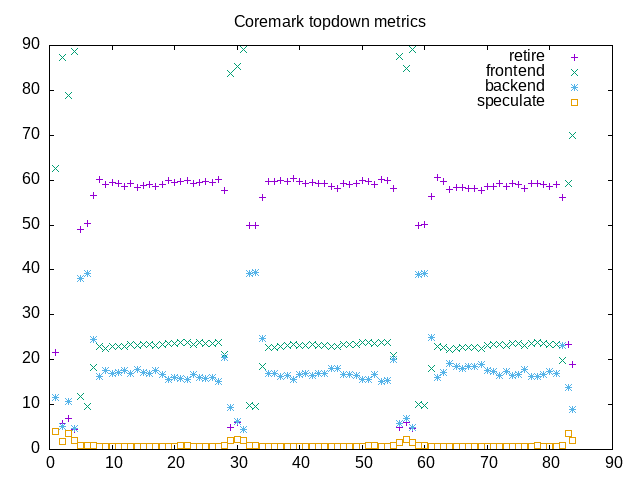
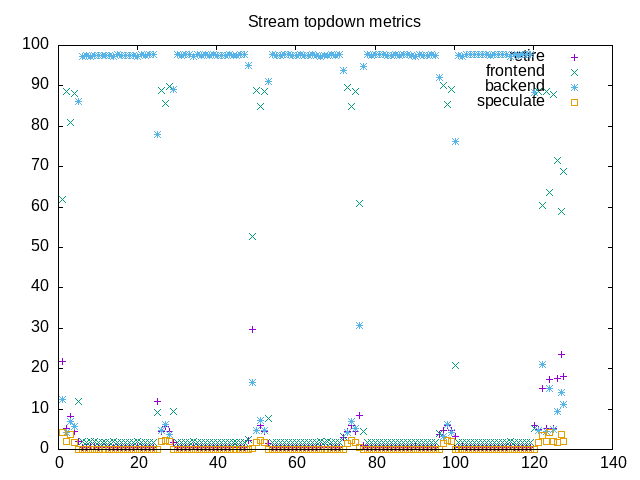
- I have implemented the “–interval” option which lets me sample counters periodically. When combined with gnuplot, –csv and -o options this lets me create some *.png files that plot topdown metrics.
The net combination is best seen below where I include both a topdown metrics summary (created from three runs of “topdown” with different options) and a topdown chart (created from a fourth run with additional options). This is a fair step along the way towards having a basic analysis tool for looking at benchmark loads. In addition to clearing up some of the issues above, I also want to add a “–tree” option to plot a process tree. Once I have that, I’ll have most of the useful bits of the program formerly named “wspy” and might also rename my “topdown” to also accept the “wspy” name.
Here is an AMD summary block with major that includes metrics for coremark:
elapsed              83.410
on_cpu               0.747          # 11.95 / 16 cores
utime                996.029
stime                0.451
nvcsw                1162           # 12.25%
nivcsw               8320           # 87.75%
inblock              0
onblock              1096
cpu-clock            996492501279   # 996.493 seconds
task-clock           996497240698   # 996.497 seconds
page faults          49987          # 50.163/sec
context switches     9695           # 9.729/sec
cpu migrations       136            # 0.136/sec
major page faults    0              # 0.000/sec
minor page faults    49985          # 50.161/sec
alignment faults     0              # 0.000/sec
emulation faults     0              # 0.000/sec
branches             1905721388306  # 189.110 branches per 1000 inst
branch misses        3005711443     # 0.16% branch miss
conditional          1674633740961  # 166.178 conditional branches per 1000 inst
indirect             9422915848     # 0.935 indirect branches per 1000 inst
cpu-cycles           4319923640733  # 3.23 GHz
instructions         10080742579393 # 2.33 IPC
slots                8640874657662  #
retiring             3015427410903  # 34.9% (58.9%)
-- ucode             6726058        #     0.0%
-- fastpath          3015420684845  #    34.9%
frontend             1175050211309  # 13.6% (22.9%)
-- latency           530224174536   #     6.1%
-- bandwidth         644826036773   #     7.5%
backend              894468621667   # 10.4% (17.5%)
-- cpu               270749606784   #     3.1%
-- memory            623719014883   #     7.2%
speculation          36309001429    #  0.4% ( 0.7%)
-- branch mispredict 34321580391    #     0.4%
-- pipeline restart  1987421038     #     0.0%
smt-contention       3519610791947  # 40.7% ( 0.0%)
instructions         5040563575655  # 0.024 l2 access per 1000 inst
l2 hit from l1       114170557      # 8.80% l2 miss
l2 miss from l1      7864844        #
l2 hit from l2 pf    5961997        #
l3 hit from l2 pf    1759222        #
l3 miss from l2 pf   1202870        #
instructions         5036908689193  # 0.085 float per 1000 inst
float 512            92             # 0.000 AVX-512 per 1000 inst
float 256            852            # 0.000 AVX-256 per 1000 inst
float 128            427687605      # 0.085 AVX-128 per 1000 inst
float MMX            0              # 0.000 MMX per 1000 inst
float scalar         0              # 0.000 scalar per 1000 inst
Here is the corresponding Intel summary block, also for coremark:
elapsed              82.626
on_cpu               0.707          # 11.31 / 16 cores
utime                934.350
stime                0.259
nvcsw                1122           # 16.56%
nivcsw               5653           # 83.44%
inblock              0
onblock              1064
cpu-clock            934609836035   # 934.610 seconds
task-clock           934612788300   # 934.613 seconds
page faults          74644          # 79.866/sec
context switches     6966           # 7.453/sec
cpu migrations       190            # 0.203/sec
major page faults    0              # 0.000/sec
minor page faults    74644          # 79.866/sec
alignment faults     0              # 0.000/sec
emulation faults     0              # 0.000/sec
branches             1487191047680  # 189.103 branches per 1000 inst
branch misses        3750608715     # 0.25% branch miss
conditional          1487191057952  # 189.103 conditional branches per 1000 inst
indirect             441335072192   # 56.118 indirect branches per 1000 inst
slots                6076449129938  #
retiring             3906991250131  # 64.3% (64.3%)
-- ucode             67666336195    #     1.1%
-- fastpath          3839324913936  #    63.2%
frontend             1246450345074  # 20.5% (20.5%)
-- latency           751572503238   #    12.4%
-- bandwidth         494877841836   #     8.1%
backend              629022362428   # 10.4% (10.4%)
-- cpu               335343935853   #     5.5%
-- memory            293678426575   #     4.8%
speculation          272715027078   #  4.5% ( 4.5%)
-- branch mispredict 256635566653   #     4.2%
-- pipeline restart  16079460425    #     0.3%
smt-contention       0              #  0.0% ( 0.0%)
cpu-cycles           3907422305230  # 2.65 GHz
instructions         9072449306543  # 2.32 IPC
l2 access            130609511      # 0.029 l2 access per 1000 inst
l2 miss              41959615       # 32.13% l2 miss
Here is the plot file of topdown metrics for coremark followed by the one for stream. From here you can see the repetition with different benchmarks as well as how the overall pattern (backend bound stream, mostly retiring coremark) show together.
Comments
Creating basic metrics and adding topdown plots — No Comments
HTML tags allowed in your comment: <a href="" title=""> <abbr title=""> <acronym title=""> <b> <blockquote cite=""> <cite> <code> <del datetime=""> <em> <i> <q cite=""> <s> <strike> <strong>