↓
 

Performance analysis, tools and experiments

An eclectic collection

  • Overview
  • Blog
  • Workloads
    • cpu2017
      • 500.perlbench_r
      • 502.gcc_r
      • 503.bwaves_r
      • 505.mcf_r
      • 507.cactuBSSN_r
      • 508.namd_r
      • 510.parest_r
      • 511.povray_r
      • 519.lbm_r
      • 520.omnetpp_r
      • 521.wrf_r
      • 523.xalancbmk_r
      • 525.x264_r
      • 526.blender_r
      • 527.cam4_r
      • 531.deepsjeng_r
      • 538.imagick_r
      • 541.leela_r
      • 544.nab_r
      • 548.exchange2_r
      • 549.fotonik3d_r
      • 554.roms_r
      • 557.xz_r
    • geekbench
    • lmbench
    • passmark
    • pbbs
    • phoronix
      • ai-benchmark
      • aircrack-ng
      • amg
      • aobench
      • aom-av1
      • apache
      • apache-iotdb
      • appleseed
      • arrayfire
      • askap
      • asmfish
      • astcenc
      • avifenc
      • basis
      • blake2
      • blogbench
      • blender
      • blosc
      • bork
      • botan
      • brl-cad
      • build-apache
      • build-clash
      • build-eigen
      • build-erlang
      • build-ffmpeg
      • build-gcc
      • build-gdb
      • build-gem5
      • build-godot
      • build-imagemagick
      • build-linux-kernel
      • build-llvm
      • build-mesa
      • build-mplayer
      • build-nodejs
      • build-php
      • build-python
      • build-wasmer
      • build2
      • bullet
      • byte
      • cachebench
      • cassandra
      • clickhouse
      • clomp
      • cloverleaf
      • cockroach
      • compilebench
      • compress-7zip
      • compress-gzip
      • compress-lz4
      • compress-pbzip2
      • compress-rar
      • compress-xz
      • compress-zstd
      • core-latency
      • coremark
      • cp2k
      • cpp-perf-bench
      • cpuminer-opt
      • crafty
      • c-ray
      • cryptopp
      • cryptsetup
      • ctx-clock
      • cython-bench
      • dacapobench
      • daphne
      • darktable
      • dav1d
      • dbench
      • deepsparse
      • deepspeech
      • dolfyn
      • draco
      • dragonflydb
      • duckdb
      • easywave
      • ebizzy
      • embree
      • encode-flac
      • encode-mp3
      • encode-opus
      • encode-wavpack
      • espeak
      • etcpak
      • faiss
      • fast-cli
      • ffmpeg
      • ffte
      • fftw
      • fhourstones
      • financebench
      • furmark
      • gcrypt
      • gegl
      • gimp
      • git
      • glibc-bench
      • gmpbench
      • gnupg
      • gnuradio
      • go-benchmark
      • gpaw
      • graph500
      • graphics-magick
      • gromacs
      • hackbench
      • hadoop
      • heffte
      • helsing
      • himeno
      • hmmer
      • hpcg
      • incompact3d
      • indigobench
      • inkscape
      • ipc-benchmark
      • java-jmh
      • java-scimark2
      • john-the-ripper
      • jpegxl
      • jpegxl-decode
      • kvazaar
      • kripke
      • lammps
      • lczero
      • libraw
      • libreoffice
      • libxsmm
      • liquid-dsp
      • llama.cpp
      • llamafile
      • lulesh
      • lzbench
      • mbw
      • memcached
      • minibude
      • minife
      • mnn
      • mpcbench
      • m-queens
      • mrbayes
      • mutex
      • namd
      • mt-dgemm
      • ncnn
      • neat
      • nettle
      • nginx
      • ngspice
      • node-octane
      • node-web-tooling
      • npb
      • n-queens
      • numpy
      • nwchem
      • oidn
      • onednn
      • octave-benchmark
      • onnx
      • opencv
      • openfoam
      • openjpeg
      • openssl
      • openradioss
      • openscad
      • openvino
      • openvkl
      • ospray
      • ospray-studio
      • palabos
      • parboil
      • pennant
      • perl-benchmark
      • pgbench
      • phpbench
      • pjsip
      • polybench-c
      • polyhedron
      • povray
      • primesieve
      • pybench
      • pyhpc
      • pyperformance
      • pytorch
      • quadray
      • qe
      • qmcpack
      • quantlib
      • quicksilver
      • ramspeed
      • rav1e
      • rawtherapee
      • rbenchmark
      • redis
      • renaissance
      • rnnoise
      • rocksdb
      • rodinia
      • rsvg
      • schbench
      • scikit-learn
      • scimark2
      • scylladb
      • securemark
      • selenium
      • simdjson
      • smallpt
      • smhasher
      • spark
      • spark-tpcds
      • speedb
      • specfem3d
      • sqlite
      • srsran
      • stargate
      • stockfish
      • stream
      • stress-ng
      • svt-av1
      • svt-hevc
      • svt-vp9
      • sudokut
      • synthmark
      • sysbench
      • tensorflow
      • tensorflow-lite
      • tesseract
      • tjbench
      • tnn
      • toybrot
      • tscp
      • ttsiod-renderer
      • tungsten
      • uvg266
      • vkpeak
      • vpxenc
      • v-ray
      • vvenc
      • webp
      • webp2
      • whisper.cpp
      • whisperfile
      • wireguard
      • x264
      • x265
      • xmrig
      • xnnpack
      • y-cruncher
      • z3
    • stream
  • Tools
    • Compilers
    • likwid
    • perf
    • trace-cmd and kernelshark
    • wspy
  • Experiments
    • Histograms
    • clustering
    • Adding summary statistics for all benchmarks
  • Home
  • Blog
  • Workloads
    • cpu2017
      • 500.perlbench_r
      • 502.gcc_r
      • 503.bwaves_r
      • 505.mcf_r
      • 507.cactuBSSN_r
      • 508.namd_r
      • 510.parest_r
      • 511.povray_r
      • 519.lbm_r
      • 520.omnetpp_r
      • 521.wrf_r
      • 523.xalancbmk_r
      • 525.x264_r
      • 526.blender_r
      • 527.cam4_r
      • 531.deepsjeng_r
      • 538.imagick_r
      • 541.leela_r
      • 544.nab_r
      • 548.exchange2_r
      • 549.fotonik3d_r
      • 554.roms_r
      • 557.xz_r
    • geekbench
    • lmbench
    • passmark
    • pbbs
    • phoronix
      • ai-benchmark
      • aircrack-ng
      • amg
      • aobench
      • aom-av1
      • apache
      • apache-iotdb
      • appleseed
      • arrayfire
      • askap
      • asmfish
      • astcenc
      • avifenc
      • b
      • basis
      • blake2
      • blender
      • blogbench
      • blosc
      • bork
      • botan
      • brl-cad
      • build-apache
      • build-clash
      • build-eigen
      • build-erlang
      • build-ffmpeg
      • build-gcc
      • build-gdb
      • build-gem5
      • build-godot
      • build-imagemagick
      • build-linux-kernel
      • build-llvm
      • build-mesa
      • build-mplayer
      • build-nodejs
      • build-php
      • build-python
      • build-wasmer
      • build2
      • bullet
      • byte
      • c-ray
      • cachebench
      • cassandra
      • clickhouse
      • clomp
      • cloverleaf
      • cockroach
      • compilebench
      • compress-7zip
      • compress-gzip
      • compress-lz4
      • compress-pbzip2
      • compress-rar
      • compress-xz
      • compress-zstd
      • core-latency
      • coremark
      • cp2k
      • cpp-perf-bench
      • cpuminer-opt
      • crafty
      • cryptopp
      • cryptsetup
      • ctx-clock
      • cython-bench
      • dacapobench
      • daphne
      • darktable
      • dav1d
      • dbench
      • deepsparse
      • deepspeech
      • dolfyn
      • draco
      • dragonflydb
      • duckdb
      • easywave
      • ebizzy
      • embree
      • encode-flac
      • encode-mp3
      • encode-opus
      • encode-wavpack
      • espeak
      • etcpak
      • faiss
      • fast-cli
      • ffmpeg
      • ffte
      • fftw
      • fhourstones
      • financebench
      • furmark
      • gcrypt
      • gegl
      • gimp
      • git
      • glibc-bench
      • gmpbench
      • gnupg
      • gnuradio
      • go-benchmark
      • gpaw
      • graph500
      • graphics-magick
      • gromacs
      • hackbench
      • hadoop
      • heffte
      • helsing
      • himeno
      • hmmer
      • hpcg
      • incompact3d
      • indigobench
      • inkscape
      • ipc-benchmark
      • java-jmh
      • java-scimark2
      • john-the-ripper
      • jpegxl
      • jpegxl-decode
      • kripke
      • kvazaar
      • lammps
      • lczero
      • libraw
      • libreoffice
      • libxsmm
      • liquid-dsp
      • llama.cpp
      • llamafile
      • lulesh
      • lzbench
      • m-queens
      • mbw
      • memcached
      • minibude
      • minife
      • mnn
      • mpcbench
      • mrbayes
      • mt-dgemm
      • mutex
      • n-queens
      • namd
      • ncnn
      • neat
      • nettle
      • nginx
      • ngspice
      • node-octane
      • node-web-tooling
      • npb
      • numpy
      • nwchem
      • octave-benchmark
      • oidn
      • onednn
      • onnx
      • opencv
      • openfoam
      • openjpeg
      • openradioss
      • openscad
      • openssl
      • openvino
      • openvkl
      • ospray
      • ospray-studio
      • palabos
      • parboil
      • pennant
      • perl-benchmark
      • pgbench
      • phpbench
      • pjsip
      • polybench-c
      • polyhedron
      • povray
      • primesieve
      • pybench
      • pyhpc
      • pyperformance
      • pytorch
      • qe
      • qmcpack
      • quadray
      • quantlib
      • quicksilver
      • ramspeed
      • rav1e
      • rawtherapee
      • rays1bench
      • rbenchmark
      • redis
      • renaissance
      • rnnoise
      • rocksdb
      • rodinia
      • rsvg
      • schbench
      • scikit-learn
      • scimark2
      • scylladb
      • securemark
      • selenium
      • simdjson
      • smallpt
      • smhasher
      • spark
      • spark-tpcds
      • specfem3d
      • speedb
      • sqlite
      • srsran
      • stargate
      • stockfish
      • stream
      • stress-ng
      • sudokut
      • svt-av1
      • svt-hevc
      • svt-vp9
      • synthmark
      • sysbench
      • tensorflow
      • tensorflow-lite
      • tesseract
      • tjbench
      • tnn
      • toybrot
      • tscp
      • ttsiod-renderer
      • tungsten
      • uvg266
      • v-ray
      • vkpeak
      • vpxenc
      • vvenc
      • webp
      • webp2
      • whisper.cpp
      • whisperfile
      • wireguard
      • x264
      • x265
      • xmrig
      • xnnpack
      • y-cruncher
      • z3
    • stream
  • Tools
    • Compilers
    • likwid
    • perf
    • trace-cmd and kernelshark
    • wspy
  • Experiments
Home→Categories hardware

Category Archives: hardware

Updating to a new kernel and graphics driver

Performance analysis, tools and experiments Posted on November 12, 2024 by mevNovember 12, 2024

My Ryzen 9 AI hx 370 system was repeatedly crashing the display. The system would still be up but dmesg told me there were cpu lockups.

Looking at Phoronix reviews of the HX 370 it suggested their laptop also saw these crashes and they updated to a newer version of the Linux kernel and Mesa graphics. So I found this page which described the “mainline” package for retrieving and picking up kernels.

That worked well until I tried “perf” and it didn’t find a perf package for my kernel. So learned another trick. If you type “sudo apt install linux-tools-” and then a tab it will try to autocomplete. More usefully it will give you a list of available tools. Once that set of perf tools is installed, I then went to do the same thing but “sudo apt install linux-image-” and picked the corresponding kernel.

No to update mesa, I found this page which gave me the instructions for getting the latest Mesa drivers. With both installed, I now will see if this helps my kernel/driver crashes.

Posted in hardware | Tagged kernel, Ryzen AI 9 HX 370 | Leave a reply

SPEC CPU2017 Ryzen AI HX 370 vs. Ryzen 7840 HS

Performance analysis, tools and experiments Posted on October 10, 2024 by mevOctober 11, 2024

As a follow up to previous posting looking at Ryzen AI HX 370, I have also done some SPEC CPU2017 experiments. My general idea is to compare the two processors with a few caveats:

  • I have used a configuration file roughly based on AMD Server configuration files and using the AMD AOCC compiler. However, because I am not trying to publish the absolute best results for hardware (and haven’t tuned to do so) – I will report relative comparison results rather than absolute numbers.
  • I expect AMD to release a new version of AMD AOCC for the Zen5 core. I didn’t have it when I did these comparisons and like using the same flags on both systems so these comparisons used the same flags for both Zen4 and Zen5 systems.
  • SPEC CPU2017 guidelines give a requirement of 2 GB of memory per core. My Ryzen 370 system has 24 cores and only 32 GB of memory. So I expect some benchmarks might run out of memory. For this reason and trying to get an overall comparison I’ve thus done two runs:
    • A 16-copy run on both systems. This uses all (hyperthreaded) cores on the Ryzen 7840 HS and a mix of hyperthreading of Zen5 cores + non-hyperthreading of Zen5C cores.
    • A 24-copy run on the Ryzen 370 system.

Relative results are shown in the tables below. This gives me some opportunities to drill a little deeper on why some benchmarks have larger gains than others.

Overall the differences between 16 threads and 24 threads are interesting. Using 24 threads seems to mostly help the intrate benchmarks with the geomean going from +12% to +21% and every benchmark improving vs 7840. Overall, using 24 threads seems to be more mixed with fprate. On average slightly slower than 16-threads. In both cases, the individual benchmarks also differ.

16-thread24-thread
500.perlbench_r1.121.24
502.gcc_r1.171.15
505.mcf_r1.091.21
520.omnetpp_r1.071.16
523.xalancbmk_r1.351.23
525.x264_r1.191.31
531.deepsjeng_r1.111.18
541.leela_r0.941.07
548.exchange_r1.241.38
557.xz_r0.961.16
geomean1.121.21

My intrate comparisons range from -6% to +35% with a geometric mean of +12%

16-thread24-thread
503.bwaves_r1.111.09
507.cactuBSSN_r1.301.25
508.namd_r1.221.34
510.parest_r1.531.10
511.povray_r1.191.30
519.lbm_r1.631.59
521.wrf_r1.321.17
526.blender_r1.241.27
527.cam4_r1.611.45
538.imagick_r1.191.32
544.nab_r1.191.31
549.fotonik_r1.111.09
554.roms_r1.431.15
geomean1.301.26

My fprate comparisons range from +11% to +63% with a geometric mean of +30%

Posted in experiment, hardware | Tagged 7840HS, cpu2017, Ryzen AI 9 HX 370, Zen5 | Leave a reply

New Ryzen AI 9 HX 370 machine

Performance analysis, tools and experiments Posted on October 8, 2024 by mevOctober 10, 2024

I have a new AMD performance machine for experiments. The processor is a Ryzen AI 9 HX 370 in a Beelink SER9 mini-PC.

Following are some of the major parameters.in comparison with my Ryzen 7840HS comparison machine.

ItemRyzen 7840HSRyzen AI 9 HX 370Notes
ArchitectureZen4Zen 5
Cores812
(4x Zen 5 and 8x Zen 5c)
Threads1624
Base Clock3.8 GHz2.0 GHz, 2.0 GHz
Boost Clock5.1 GHz5.1 GHz, 3.3 GHz
TDP35-45W15-54WSet by vendor
Memory32 GB (2 x 16 GiB)

DDR5 – 5600

2 Memory Channels
32 GB (4x 8 GiB)

DDR5 – 7500

2 Memory Channels
Check BIOS for actual speed
StreamCopy: 71400 MB/s
Scale: 70300 MB/s
Add: 73600 MB/s
Triad: 73000 MB/s
Copy: 86725 MB/s
Scale: 86626 MS/s
Add: 88192 MB/s
Triad: 87655 MB/s
Measured
CacheL1 – 32kB, 8 way, 4 clocks

L2 – 1 MB, 8-way, 14 clocks

L3 – 16MB, 24 way, 47 clocks
L1 – 32kB

L2 – 1 MB

L3 – 24 MB
Agner Fog architecture document and likwid-topology
lmbenchL1 – 0.8 ns
L2 – 3 ns
L3 – 8 ns
L1 – 0.8 ns
L2 – 3ns
L3 – 8 ns
Measured in Nanoseconds
GraphicsRadeon 780M

12 cores

2700 MHz
Radeon 890M

16 cores

2900 MHz
Phoronix streamAverage: 40604 MB/sAverage 44500 MB/s
Phoronix coremarkAverage 464076 Iterations/secondAverage 563477 Iterations/second+21%

Following are the results from likwid-topology. This is a hybrid core with four Zen5 cores and eight Zen5c cores. I believe the first four cores are Zen5 and the remaining eight are Zen5c.

--------------------------------------------------------------------------------
CPU name:	AMD Ryzen AI 9 HX 370 w/ Radeon 890M           
CPU type:	nil
CPU stepping:	0
********************************************************************************
Hardware Thread Topology
********************************************************************************
Sockets:		1
Cores per socket:	12
Threads per core:	2
--------------------------------------------------------------------------------
HWThread        Thread        Core        Die        Socket        Available
0               0             0           0          0             *                
1               0             1           0          0             *                
2               0             2           0          0             *                
3               0             3           0          0             *                
4               0             4           0          0             *                
5               0             5           0          0             *                
6               0             6           0          0             *                
7               0             7           0          0             *                
8               0             8           0          0             *                
9               0             9           0          0             *                
10              0             10          0          0             *                
11              0             11          0          0             *                
12              1             0           0          0             *                
13              1             1           0          0             *                
14              1             2           0          0             *                
15              1             3           0          0             *                
16              1             4           0          0             *                
17              1             5           0          0             *                
18              1             6           0          0             *                
19              1             7           0          0             *                
20              1             8           0          0             *                
21              1             9           0          0             *                
22              1             10          0          0             *                
23              1             11          0          0             *                
--------------------------------------------------------------------------------
Socket 0:		( 0 12 1 13 2 14 3 15 4 16 5 17 6 18 7 19 8 20 9 21 10 22 11 23 )
--------------------------------------------------------------------------------
********************************************************************************
Cache Topology
********************************************************************************
Level:			1
Size:			48 kB
Cache groups:		( 0 12 ) ( 1 13 ) ( 2 14 ) ( 3 15 ) ( 4 16 ) ( 5 17 ) ( 6 18 ) ( 7 19 ) ( 8 20 ) ( 9 21 ) ( 10 22 ) ( 11 23 )
--------------------------------------------------------------------------------
Level:			2
Size:			1 MB
Cache groups:		( 0 12 ) ( 1 13 ) ( 2 14 ) ( 3 15 ) ( 4 16 ) ( 5 17 ) ( 6 18 ) ( 7 19 ) ( 8 20 ) ( 9 21 ) ( 10 22 ) ( 11 23 )
--------------------------------------------------------------------------------
Level:			3
Size:			16 MB
Cache groups:		( 0 12 1 13 2 14 3 15 ) ( 4 16 5 17 6 18 7 19 ) ( 8 20 9 21 10 22 11 23 )
--------------------------------------------------------------------------------
********************************************************************************
NUMA Topology
********************************************************************************
NUMA domains:		1
--------------------------------------------------------------------------------
Domain:			0
Processors:		( 0 12 1 13 2 14 3 15 4 16 5 17 6 18 7 19 8 20 9 21 10 22 11 23 )
Distances:		10
Free memory:		22667.5 MB
Total memory:		27574.2 MB
--------------------------------------------------------------------------------

The L3 cache amount may be incorrect as specifications suggest 24 MB of cache. Using lmbench suggests the L3 cache attached to first four cores is 16MB and the next groups have 8MB likely together even though topology above makes them separate.

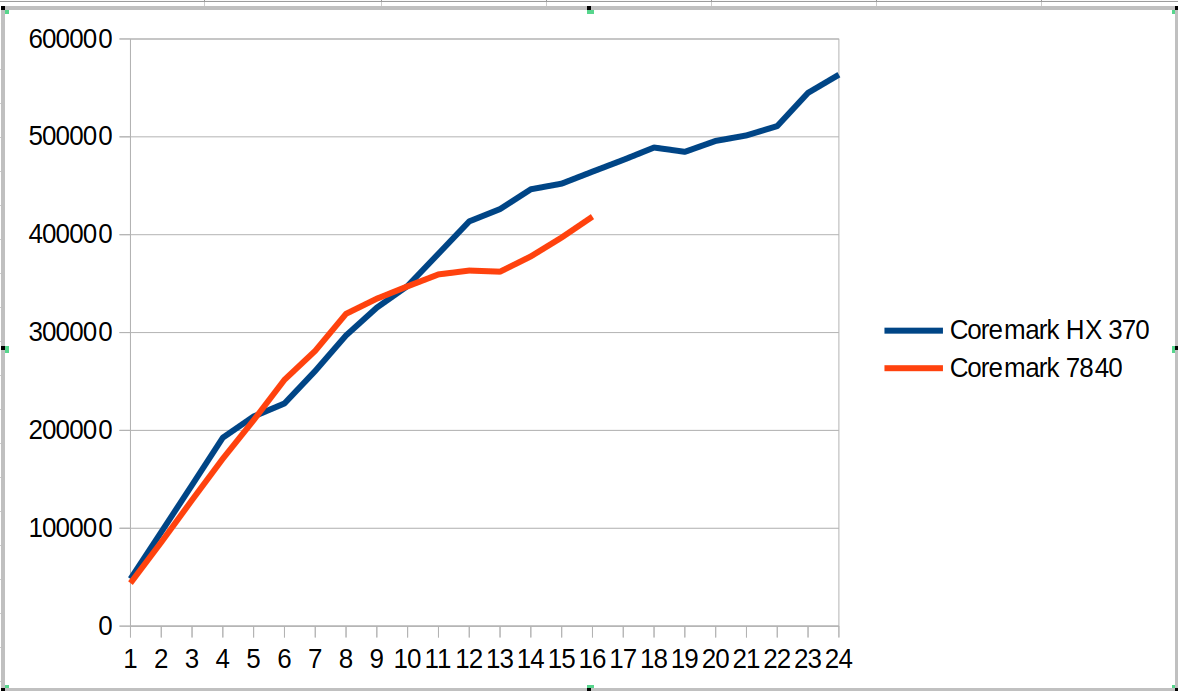
This hybrid SOC shows up in the following coremark scaling comparison as shown in the graph below. There are several different regions

  • From 1 to 4 cores we compare Zen4 cores against Zen5 cores. The coremark value for 4 cores is ~12% ahead.
  • From 5 to 8 cores, we now have Zen5 + Zen5C cores against Zen4 cores. The coremark value for 8 cores is ~7% behind
  • From 9 to 12 cores, we use all the cores on HX 370 and start using SMT for the 7840. The coremark value for 12 cores is 6% ahead
  • From 13 to 16 cores we go to using SMT for all the Zen5 cores and not-SMT for Zen5C cores. The 7840 moves to fully SMT. The coremark value for 16 cores is 11% ahead
  • From 17 to 24 cores, we go to adding SMT for Zen5C cores. The overall coremark using all cores (24 vs 16) is 21% ahead.

This suggests for coremark and other workloads there will be different regions where combinations of SMT and Zen5 vs Zen5C cores will create interesting comparisons between the systems.

The tabular version of coremark including performance counters is shown below.

CoresCoremark HX 370Coremark 7840Scaling HX 370Scaling 7840Retiring HX 370Frontend HX 370Backend HX 370Speculation HX 370SMT-contention HX 370Retiring 7840Frontend 7840Backend 7840Speculation 7840SMT-contention 7840
14824543881100%100%44.2%25.2%62.0%2.0%0.0%43.9%12.4%43.0%0.7%0.0%
29610685758100%98%44.0%25.5%61.8%2.0%0.0%43.9%12.4%43.1%0.7%0.0%
3144147128841100%98%44.0%25.5%61.8%2.0%0.0%43.6%13.0%42.7%0.7%0.0%
4192537171061100%97%44.1%25.4%61.9%2.0%0.0%43.9%12.3%43.1%0.7%0.0%
521422321036889%96%44.0%25.5%61.8%2.0%0.0%43.9%12.3%43.1%0.7%0.0%
622753225170579%96%44.0%25.4%61.9%2.0%0.0%43.2%12.9%43.2%0.7%0.0%
726081128136977%92%44.0%25.7%61.7%2.0%0.0%43.3%12.2%43.7%0.7%0.0%
829700231909877%91%44.1%25.3%61.9%2.0%0.0%42.7%12.8%43.8%0.7%0.0%
932541733460275%85%44.1%25.3%62.0%2.0%0.0%40.2%15.9%36.3%0.6%7.1%
1034763634724672%79%44.0%25.3%61.9%2.0%0.0%38.4%17.8%30.2%0.5%13.1%
1138058735940272%74%44.0%25.5%61.8%2.0%0.0%36.9%19.6%25.3%0.5%17.8%
1241357536328871%69%44.0%25.4%61.9%2.0%0.0%35.5%21.1%21.6%0.4%21.3%
1342612336214468%63%42.1%28.2%52.9%1.8%8.3%34.4%22.4%18.5%0.4%24.3%
1444637937776766%61%40.5%30.6%45.6%1.6%15.1%33.1%24.4%15.2%0.4%26.9%
1545213439714562%60%39.5%32.2%40.6%1.4%19.7%32.2%25.3%12.0%0.3%30.2%
1646443141846260%60%38.3%33.7%35.8%1.3%24.2%31.1%26.0%9.5%0.3%33.1%
1747641658%37.9%34.4%33.5%1.2%26.3%
1848900156%37.2%35.0%31.2%1.2%28.7%
1948465553%36.6%35.4%29.2%1.1%30.9%
2049582651%36.5%36.5%26.3%1.0%33.1%
2150145749%35.7%37.3%23.9%1.0%35.5%
2251094648%35.1%37.7%22.0%0.9%37.6%
2354489549%34.7%38.5%19.5%0.8%39.8%
2456347749%34.0%38.2%19.4%0.8%40.9%

I also measured stream and it looks ~15% faster than my 7840 system.

-------------------------------------------------------------
STREAM version $Revision: 5.10 $
-------------------------------------------------------------
This system uses 8 bytes per array element.
-------------------------------------------------------------
Array size = 100000000 (elements), Offset = 0 (elements)
Memory per array = 762.9 MiB (= 0.7 GiB).
Total memory required = 2288.8 MiB (= 2.2 GiB).
Each kernel will be executed 100 times.
 The *best* time for each kernel (excluding the first iteration)
 will be used to compute the reported bandwidth.
-------------------------------------------------------------
Number of Threads requested = 2
Number of Threads counted = 2
-------------------------------------------------------------
Your clock granularity/precision appears to be 1 microseconds.
Each test below will take on the order of 31409 microseconds.
   (= 31409 clock ticks)
Increase the size of the arrays if this shows that
you are not getting at least 20 clock ticks per test.
-------------------------------------------------------------
WARNING -- The above is only a rough guideline.
For best results, please be sure you know the
precision of your system timer.
-------------------------------------------------------------
Function    Best Rate MB/s  Avg time     Min time     Max time
Copy:           86725.2     0.018665     0.018449     0.021070
Scale:          86626.7     0.018713     0.018470     0.020643
Add:            88192.8     0.027540     0.027213     0.031095
Triad:          87655.3     0.027729     0.027380     0.031028
-------------------------------------------------------------
Solution Validates: avg error less than 1.000000e-13 on all three arrays
-------------------------------------------------------------

Here is a phoronix article comparing Ryzen AI 9 HX 370 with a variety of laptop systems. The overall geomean is ~10% but there is a wider variety between tests. Can be interesting to puzzle out why some of the differences. It is also likely that the power points used for the laptop comparisons in the phoronix article are less since I see lower scores e.g. coremark or different gaps than what I see with the same benchmark. So will need to puzzle out some of the SOC/power choices.

Posted in experiment, hardware | Tagged 7840HS, coremark, Ryzen AI 9 HX 370, stream, Zen5 | Leave a reply

Ryzen AI, Zen5, article and laptop

Performance analysis, tools and experiments Posted on July 28, 2024 by mevJuly 28, 2024

Zen5 mobile processors have been released. I had ordered an ASUS Zenbook S16 laptop with Ryzen 9 AI 365 processor and it arrived today. Full tech specifications are at the link but include: So far I have only run Windows … Continue reading →

Posted in hardware | Tagged phoronix, Ryzen AI 365, wsl, Zen5 | Leave a reply

New i5-13500H machine

Performance analysis, tools and experiments Posted on December 19, 2023 by mevDecember 19, 2023

I have set up a new Intel performance machine for experiments. The processor is a i5-13500H in a Geekom MiniIT13 mini-PC. Following are some of the major parameters. This comparison is with Ryzen 7840 which will be my AMD comparison … Continue reading →

Posted in hardware | Tagged i5-13500H | Leave a reply

New Ryzen 7840 machine

Performance analysis, tools and experiments Posted on December 17, 2023 by mevDecember 17, 2023

I have set up a new AMD performance machine for experiments. The processors is a Ryzen 7840 (Phoenix) in a Beelink SER7 mini-PC. Following are some of the major parameters. This comparison is with Intel i5-13500H which will be my … Continue reading →

Posted in hardware | Tagged 7840HS | Leave a reply

Performance Counters required to compute topdown metrics

Performance analysis, tools and experiments Posted on February 23, 2023 by mevFebruary 23, 2023

From past work, we know the five counters required to compute the first level topdown metrics on Intel processors: CLK_UNHALTED_CORE = 0x00 IDQ_UOPS_NOT_DELIVERED_CORE = 0x9C, umask=1 UOPS_RETIRED_RETIRE_SLOTS = 0xC2, umask=2 UOPS_ISSUED_ANY = 0x0E, umask=1 INT_MISC_RECOVERY_CYCLES = 0x0d, umask=3, cmask=1 These … Continue reading →

Posted in hardware | Tagged perf, performance counters, topdown | Leave a reply

Meta

  • Log in
  • Entries feed
  • Comments feed
  • WordPress.org

Archives

  • November 2024
  • October 2024
  • September 2024
  • July 2024
  • June 2024
  • March 2024
  • February 2024
  • January 2024
  • December 2023
  • February 2023

Tags

7840HS bad data benchmarks cachyos cluster compiler coremark cpu2017 data fabric getrusage gnuplot i5-13500H icache ipc kernel l3 metrics namd opcache perf performance counters perf_event_open phoronix Ryzen AI 9 HX 370 Ryzen AI 365 scaling stream threshold topdown tree virtualization website wsl Zen5

Recent Posts

  • Virtualization comparisons
  • Updating to a new kernel and graphics driver
  • SPEC CPU2017 Ryzen AI HX 370 vs. Ryzen 7840 HS
  • phoronix – Ryzen AI HX 370 vs Ryzen 7840 HS
  • New Ryzen AI 9 HX 370 machine
©2026 - Performance analysis, tools and experiments - Weaver Xtreme Theme
↑