↓
 

Performance analysis, tools and experiments

An eclectic collection

  • Overview
  • Blog
  • Workloads
    • cpu2017
      • 500.perlbench_r
      • 502.gcc_r
      • 503.bwaves_r
      • 505.mcf_r
      • 507.cactuBSSN_r
      • 508.namd_r
      • 510.parest_r
      • 511.povray_r
      • 519.lbm_r
      • 520.omnetpp_r
      • 521.wrf_r
      • 523.xalancbmk_r
      • 525.x264_r
      • 526.blender_r
      • 527.cam4_r
      • 531.deepsjeng_r
      • 538.imagick_r
      • 541.leela_r
      • 544.nab_r
      • 548.exchange2_r
      • 549.fotonik3d_r
      • 554.roms_r
      • 557.xz_r
    • geekbench
    • lmbench
    • passmark
    • pbbs
    • phoronix
      • ai-benchmark
      • aircrack-ng
      • amg
      • aobench
      • aom-av1
      • apache
      • apache-iotdb
      • appleseed
      • arrayfire
      • askap
      • asmfish
      • astcenc
      • avifenc
      • basis
      • blake2
      • blogbench
      • blender
      • blosc
      • bork
      • botan
      • brl-cad
      • build-apache
      • build-clash
      • build-eigen
      • build-erlang
      • build-ffmpeg
      • build-gcc
      • build-gdb
      • build-gem5
      • build-godot
      • build-imagemagick
      • build-linux-kernel
      • build-llvm
      • build-mesa
      • build-mplayer
      • build-nodejs
      • build-php
      • build-python
      • build-wasmer
      • build2
      • bullet
      • byte
      • cachebench
      • cassandra
      • clickhouse
      • clomp
      • cloverleaf
      • cockroach
      • compilebench
      • compress-7zip
      • compress-gzip
      • compress-lz4
      • compress-pbzip2
      • compress-rar
      • compress-xz
      • compress-zstd
      • core-latency
      • coremark
      • cp2k
      • cpp-perf-bench
      • cpuminer-opt
      • crafty
      • c-ray
      • cryptopp
      • cryptsetup
      • ctx-clock
      • cython-bench
      • dacapobench
      • daphne
      • darktable
      • dav1d
      • dbench
      • deepsparse
      • deepspeech
      • dolfyn
      • draco
      • dragonflydb
      • duckdb
      • easywave
      • ebizzy
      • embree
      • encode-flac
      • encode-mp3
      • encode-opus
      • encode-wavpack
      • espeak
      • etcpak
      • faiss
      • fast-cli
      • ffmpeg
      • ffte
      • fftw
      • fhourstones
      • financebench
      • furmark
      • gcrypt
      • gegl
      • gimp
      • git
      • glibc-bench
      • gmpbench
      • gnupg
      • gnuradio
      • go-benchmark
      • gpaw
      • graph500
      • graphics-magick
      • gromacs
      • hackbench
      • hadoop
      • heffte
      • helsing
      • himeno
      • hmmer
      • hpcg
      • incompact3d
      • indigobench
      • inkscape
      • ipc-benchmark
      • java-jmh
      • java-scimark2
      • john-the-ripper
      • jpegxl
      • jpegxl-decode
      • kvazaar
      • kripke
      • lammps
      • lczero
      • libraw
      • libreoffice
      • libxsmm
      • liquid-dsp
      • llama.cpp
      • llamafile
      • lulesh
      • lzbench
      • mbw
      • memcached
      • minibude
      • minife
      • mnn
      • mpcbench
      • m-queens
      • mrbayes
      • mutex
      • namd
      • mt-dgemm
      • ncnn
      • neat
      • nettle
      • nginx
      • ngspice
      • node-octane
      • node-web-tooling
      • npb
      • n-queens
      • numpy
      • nwchem
      • oidn
      • onednn
      • octave-benchmark
      • onnx
      • opencv
      • openfoam
      • openjpeg
      • openssl
      • openradioss
      • openscad
      • openvino
      • openvkl
      • ospray
      • ospray-studio
      • palabos
      • parboil
      • pennant
      • perl-benchmark
      • pgbench
      • phpbench
      • pjsip
      • polybench-c
      • polyhedron
      • povray
      • primesieve
      • pybench
      • pyhpc
      • pyperformance
      • pytorch
      • quadray
      • qe
      • qmcpack
      • quantlib
      • quicksilver
      • ramspeed
      • rav1e
      • rawtherapee
      • rbenchmark
      • redis
      • renaissance
      • rnnoise
      • rocksdb
      • rodinia
      • rsvg
      • schbench
      • scikit-learn
      • scimark2
      • scylladb
      • securemark
      • selenium
      • simdjson
      • smallpt
      • smhasher
      • spark
      • spark-tpcds
      • speedb
      • specfem3d
      • sqlite
      • srsran
      • stargate
      • stockfish
      • stream
      • stress-ng
      • svt-av1
      • svt-hevc
      • svt-vp9
      • sudokut
      • synthmark
      • sysbench
      • tensorflow
      • tensorflow-lite
      • tesseract
      • tjbench
      • tnn
      • toybrot
      • tscp
      • ttsiod-renderer
      • tungsten
      • uvg266
      • vkpeak
      • vpxenc
      • v-ray
      • vvenc
      • webp
      • webp2
      • whisper.cpp
      • whisperfile
      • wireguard
      • x264
      • x265
      • xmrig
      • xnnpack
      • y-cruncher
      • z3
    • stream
  • Tools
    • Compilers
    • likwid
    • perf
    • trace-cmd and kernelshark
    • wspy
  • Experiments
    • Histograms
    • clustering
    • Adding summary statistics for all benchmarks
  • Home
  • Blog
  • Workloads
    • cpu2017
      • 500.perlbench_r
      • 502.gcc_r
      • 503.bwaves_r
      • 505.mcf_r
      • 507.cactuBSSN_r
      • 508.namd_r
      • 510.parest_r
      • 511.povray_r
      • 519.lbm_r
      • 520.omnetpp_r
      • 521.wrf_r
      • 523.xalancbmk_r
      • 525.x264_r
      • 526.blender_r
      • 527.cam4_r
      • 531.deepsjeng_r
      • 538.imagick_r
      • 541.leela_r
      • 544.nab_r
      • 548.exchange2_r
      • 549.fotonik3d_r
      • 554.roms_r
      • 557.xz_r
    • geekbench
    • lmbench
    • passmark
    • pbbs
    • phoronix
      • ai-benchmark
      • aircrack-ng
      • amg
      • aobench
      • aom-av1
      • apache
      • apache-iotdb
      • appleseed
      • arrayfire
      • askap
      • asmfish
      • astcenc
      • avifenc
      • b
      • basis
      • blake2
      • blender
      • blogbench
      • blosc
      • bork
      • botan
      • brl-cad
      • build-apache
      • build-clash
      • build-eigen
      • build-erlang
      • build-ffmpeg
      • build-gcc
      • build-gdb
      • build-gem5
      • build-godot
      • build-imagemagick
      • build-linux-kernel
      • build-llvm
      • build-mesa
      • build-mplayer
      • build-nodejs
      • build-php
      • build-python
      • build-wasmer
      • build2
      • bullet
      • byte
      • c-ray
      • cachebench
      • cassandra
      • clickhouse
      • clomp
      • cloverleaf
      • cockroach
      • compilebench
      • compress-7zip
      • compress-gzip
      • compress-lz4
      • compress-pbzip2
      • compress-rar
      • compress-xz
      • compress-zstd
      • core-latency
      • coremark
      • cp2k
      • cpp-perf-bench
      • cpuminer-opt
      • crafty
      • cryptopp
      • cryptsetup
      • ctx-clock
      • cython-bench
      • dacapobench
      • daphne
      • darktable
      • dav1d
      • dbench
      • deepsparse
      • deepspeech
      • dolfyn
      • draco
      • dragonflydb
      • duckdb
      • easywave
      • ebizzy
      • embree
      • encode-flac
      • encode-mp3
      • encode-opus
      • encode-wavpack
      • espeak
      • etcpak
      • faiss
      • fast-cli
      • ffmpeg
      • ffte
      • fftw
      • fhourstones
      • financebench
      • furmark
      • gcrypt
      • gegl
      • gimp
      • git
      • glibc-bench
      • gmpbench
      • gnupg
      • gnuradio
      • go-benchmark
      • gpaw
      • graph500
      • graphics-magick
      • gromacs
      • hackbench
      • hadoop
      • heffte
      • helsing
      • himeno
      • hmmer
      • hpcg
      • incompact3d
      • indigobench
      • inkscape
      • ipc-benchmark
      • java-jmh
      • java-scimark2
      • john-the-ripper
      • jpegxl
      • jpegxl-decode
      • kripke
      • kvazaar
      • lammps
      • lczero
      • libraw
      • libreoffice
      • libxsmm
      • liquid-dsp
      • llama.cpp
      • llamafile
      • lulesh
      • lzbench
      • m-queens
      • mbw
      • memcached
      • minibude
      • minife
      • mnn
      • mpcbench
      • mrbayes
      • mt-dgemm
      • mutex
      • n-queens
      • namd
      • ncnn
      • neat
      • nettle
      • nginx
      • ngspice
      • node-octane
      • node-web-tooling
      • npb
      • numpy
      • nwchem
      • octave-benchmark
      • oidn
      • onednn
      • onnx
      • opencv
      • openfoam
      • openjpeg
      • openradioss
      • openscad
      • openssl
      • openvino
      • openvkl
      • ospray
      • ospray-studio
      • palabos
      • parboil
      • pennant
      • perl-benchmark
      • pgbench
      • phpbench
      • pjsip
      • polybench-c
      • polyhedron
      • povray
      • primesieve
      • pybench
      • pyhpc
      • pyperformance
      • pytorch
      • qe
      • qmcpack
      • quadray
      • quantlib
      • quicksilver
      • ramspeed
      • rav1e
      • rawtherapee
      • rays1bench
      • rbenchmark
      • redis
      • renaissance
      • rnnoise
      • rocksdb
      • rodinia
      • rsvg
      • schbench
      • scikit-learn
      • scimark2
      • scylladb
      • securemark
      • selenium
      • simdjson
      • smallpt
      • smhasher
      • spark
      • spark-tpcds
      • specfem3d
      • speedb
      • sqlite
      • srsran
      • stargate
      • stockfish
      • stream
      • stress-ng
      • sudokut
      • svt-av1
      • svt-hevc
      • svt-vp9
      • synthmark
      • sysbench
      • tensorflow
      • tensorflow-lite
      • tesseract
      • tjbench
      • tnn
      • toybrot
      • tscp
      • ttsiod-renderer
      • tungsten
      • uvg266
      • v-ray
      • vkpeak
      • vpxenc
      • vvenc
      • webp
      • webp2
      • whisper.cpp
      • whisperfile
      • wireguard
      • x264
      • x265
      • xmrig
      • xnnpack
      • y-cruncher
      • z3
    • stream
  • Tools
    • Compilers
    • likwid
    • perf
    • trace-cmd and kernelshark
    • wspy
  • Experiments
Home→Published 2024 → January

Monthly Archives: January 2024

Close to 100 workloads, adding thresholds

Performance analysis, tools and experiments Posted on January 26, 2024 by mevJanuary 26, 2024

I am now close to 100 overall phoronix tests added. Recent articles still include a number of new benchmarks, typically I have ~2/3 of the ones in an article and then need to add the remaining ones. However, over time have to get closer to having all the ones as articles come out.

As I have this number of workloads, I can now start to set more precise thresholds on what it means to be “high” or “low” on a metric. These could be slightly different between my AMD and Intel CPU –

  • IPC reported by Intel is slightly higher
  • Retirement rate reported by Intel is slightly higher
  • Frontend and backend stalls reported by Intel are slightly lower
  • Speculation misses reported by Intel are higher

Some of this might be because of differences in how the metrics are defined/counted and some due to the processors themselves. However, for now I’ve hard coded some thresholds into the tool that are same for both since these are mostly guidance and over time if my workload mix shifts or I find different values on other processors, I might adjust. Following are the initial guidelines added:

MetricHighLow
IPC3.00.7
retiring54%14%
frontend45%5%
backend70%18%
retiring10%1%
Posted in experiment, Tools | Tagged ipc, threshold, topdown | Leave a reply

50 phoronix workloads…

Performance analysis, tools and experiments Posted on January 14, 2024 by mevJanuary 14, 2024

I am now up to 50 phoronix workloads as summarized on the workloads page. For each one I have a graph and some pages of information. My general idea is to take the benchmark-based Phoronix articles and see if I can start to keep up with cpu-focused benchmarks used. So far there have been three articles:

  • January 4th – https://www.phoronix.com/review/intel-meteorlake-gcc-clang compiler performance focus where I have most of the benchmarks and still need six more. What I haven’t done is reproduce the recompilations used in the article. I expect to get the last six benchmarks.
  • January 5th – https://www.phoronix.com/review/intel-5th-gen-xeon-avx512 Emerald Rapids AVX-512 performance. I have all the benchmarks here, though haven’t recompiled to see where AVX-512 helps and how it alters the profiles.
  • January 7th – https://www.phoronix.com/review/z1-extreme-meteorlake is more focused on graphics with one non-graphics benchmark missing (simdjson); having some difficulties getting this one to run. Not sure how much I will run the graphics benchmarks.

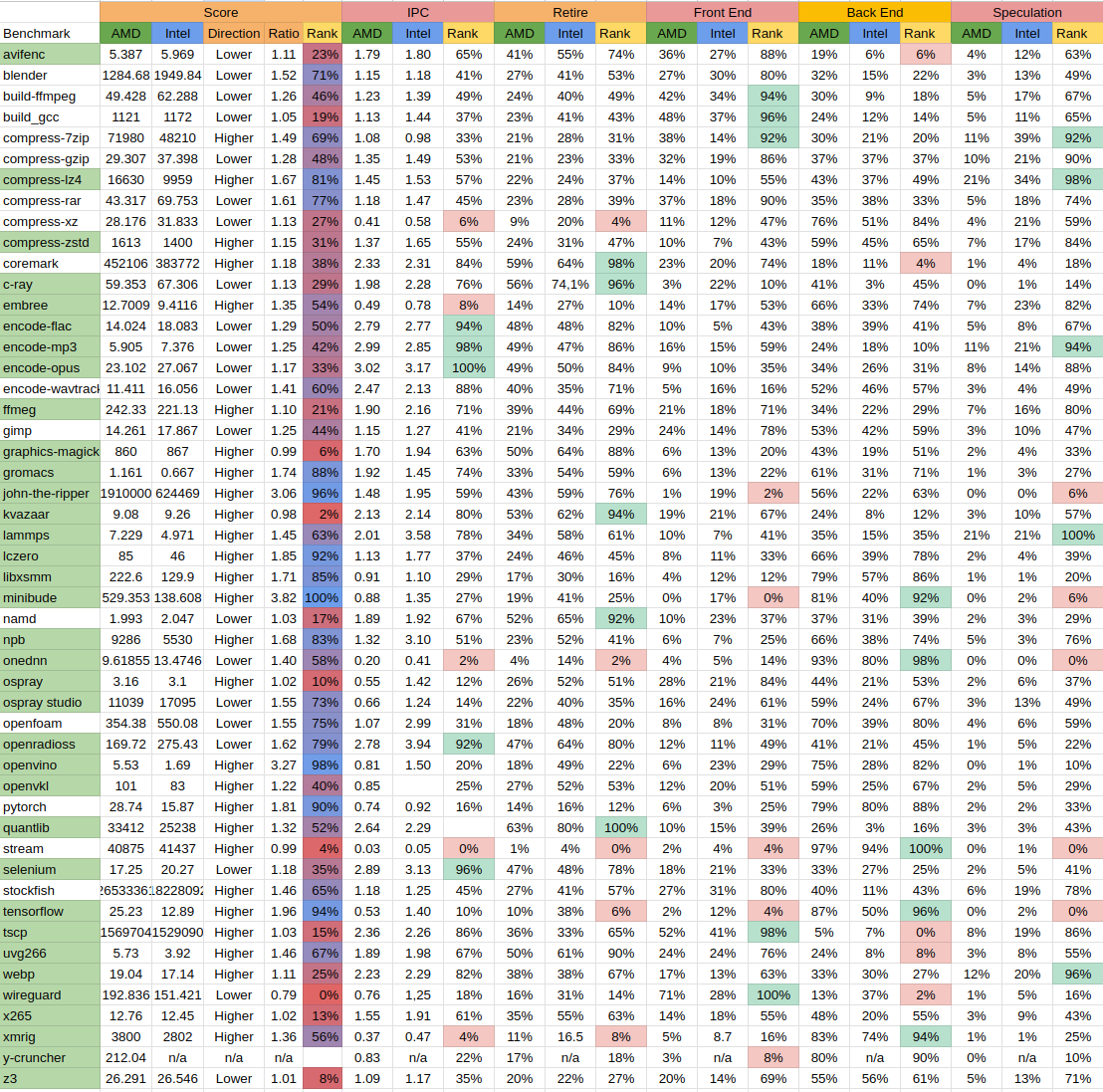
At this point I expect if I try knocking off one benchmark a day, I should be able to keep up with newer articles for most benchmarks. This also gets me a good database to compare various metrics both in the metrics table and separately I have an Excel sheet that looks like below. This helps me compare these workloads to see what high/low values for topdown/ipc might metrics might be. Listed in green are those in top 10% and red are bottom 10% of each metric. On the left column those in green were part of a phoronix article and others were not.

This has also let me tune my workflow and gradually consider adding graphs as it made sense. I can now also look at high/low outliers from table below and dive deeper , e.g. on areas where one metric dominates.

There are some areas it also lets me consider a little further…

  • There is some additional automation I could do, for example
    • More automatically generate web pages; perhaps not in the wordpress style but I can automatically generate pages that insert graphs and labels.
    • Rather than populate the table manually, have my tests generate MySQL code that can insert entries into a database. This more easily would let me expand the table to include metrics I don’t currently such as the amount of floating point or branch/cache miss ratios.
  • Phoronix has a notion of a “default-benchmark” I have been running all the benchmarks which sometimes gives me a view of differences, but using a default might make them more comparable.
  • Phoronix saves test results in an XML file. At minimum I might also save that file, but also see about more automatically printing the phoronix result? Perhaps part of using phoronix generation scripts for printing results.

This also gives me an area to dig deeper on various workloads and then incrementally improve the tools as well.

Posted in experiment | Tagged benchmarks, phoronix | Leave a reply

topdown – adding process trees and statistics

Performance analysis, tools and experiments Posted on January 1, 2024 by mevJanuary 1, 2024

I have not enhanced the topdown tool with ability to print process trees. This enables the key features of my previous “wspy” command.

The interfaces is as follows. I added the following options to topdown to record process information:

	--tree <file>             - create CSV of processes
	--tree-cmdline            - record full command lines

The –tree option uses strace(2) to record fork/exec/exit events and save information to the file for later processing. An example of some information saved is as follows:

0.000 14119 root
0.002 14119 fork 14120
0.017 14120 comm cc1
0.017 14120 cmdline /usr/lib/gcc/x86_64-linux-gnu/11/cc1 -quiet -imultiarch x86_64-linux-gnu hello.c -quiet -dumpbase hello.c -dumpbase-ext .c -mtune=generic -march=x86-64 -fasynchronous-unwind-tables -fstack-protector-strong -Wformat -Wformat-security -fstack-clash-protection -fcf-protection -o /tmp/ccIyphnx.s
0.017 14120 exit 14120 (cc1) t 14119 14118 13158 34819 14118 1077936128 1221 0 0 0 1 0 0 0 20 0 1 0 1313576 46571520 3835 18446744073709551615 5890048 21573621 140722169364960 0 0 0 0 0 1256 1 0 0 17 18 0 0 0 0 0 30095936 30148584 59514880 140722169373230 140722169373523 140722169373523 140722169376723 0
0.018 14119 fork 14121
0.021 14121 comm as
0.021 14121 cmdline as --64 -o /tmp/cceku4R5.o /tmp/ccIyphnx.s
0.021 14121 exit 14121 (as) t 14119 14118 13158 34819 14118 1077936128 441 0 0 0 0 0 0 0 20 0 1 0 1313578 12435456 1332 18446744073709551615 94138168020992 94138168333961 140723056042896 0 0 0 0 0 1256 1 0 0 17 11 0 0 0 0 0 94138168430896 94138168453272 94138176069632 140723056051009 140723056051052 140723056051052 140723056054252 0
0.022 14119 fork 14124
0.023 14124 fork 14125
0.040 14125 comm ld
0.040 14125 cmdline /usr/bin/ld -plugin /usr/lib/gcc/x86_64-linux-gnu/11/liblto_plugin.so -plugin-opt=/usr/lib/gcc/x86_64-linux-gnu/11/lto-wrapper -plugin-opt=-fresolution=/tmp/ccWwmx4O.res -plugin-opt=-pass-through=-lgcc -plugin-opt=-pass-through=-lgcc_s -plugin-opt=-pass-through=-lc -plugin-opt=-pass-through=-lgcc -plugin-opt=-pass-through=-lgcc_s --build-id --eh-frame-hdr -m elf_x86_64 --hash-style=gnu --as-needed -dynamic-linker /lib64/ld-linux-x86-64.so.2 -pie -z now -z relro -o hello /usr/lib/gcc/x86_64-linux-gnu/11/../../../x86_64-linux-gnu/Scrt1.o /usr/lib/gcc/x86_64-linux-gnu/11/../../../x86_64-linux-gnu/crti.o /usr/lib/gcc/x86_64-linux-gnu/11/crtbeginS.o -L/usr/lib/gcc/x86_64-linux-gnu/11 -L/usr/lib/gcc/x86_64-linux-gnu/11/../../../x86_64-linux-gnu -L/usr/lib/gcc/x86_64-linux-gnu/11/../../../../lib -L/lib/x86_64-linux-gnu -L/lib/../lib -L/usr/lib/x86_64-linux-gnu -L/usr/lib/../lib -L/usr/lib/gcc/x86_64-linux-gnu/11/../../.. /tmp/cceku4R5.o -lgcc --push-state --as-needed -lgcc_s --pop-state -lc -lgcc --push-state --as-needed -lgcc_s --pop-state /usr/lib/gcc/x86_64-linux-gnu/11/crtendS.o /usr/lib/gcc/x86_64-linux-gnu/11/../../../x86_64-linux-gnu/crtn.o
0.040 14125 exit 14125 (ld) t 14124 14118 13158 34819 14118 1077936128 1732 0 0 0 1 0 0 0 20 0 1 0 1313578 16846848 2276 18446744073709551615 94366230806528 94366231102693 140724178835088 0 0 0 0 0 0 1 0 0 17 20 0 0 0 0 0 94366232461104 94366232495352 94366259900416 140724178836727 140724178837886 140724178837886 140724178841580 0
0.040 14124 comm collect2
0.040 14124 cmdline /usr/lib/gcc/x86_64-linux-gnu/11/collect2 -plugin /usr/lib/gcc/x86_64-linux-gnu/11/liblto_plugin.so -plugin-opt=/usr/lib/gcc/x86_64-linux-gnu/11/lto-wrapper -plugin-opt=-fresolution=/tmp/ccWwmx4O.res -plugin-opt=-pass-through=-lgcc -plugin-opt=-pass-through=-lgcc_s -plugin-opt=-pass-through=-lc -plugin-opt=-pass-through=-lgcc -plugin-opt=-pass-through=-lgcc_s --build-id --eh-frame-hdr -m elf_x86_64 --hash-style=gnu --as-needed -dynamic-linker /lib64/ld-linux-x86-64.so.2 -pie -z now -z relro -o hello /usr/lib/gcc/x86_64-linux-gnu/11/../../../x86_64-linux-gnu/Scrt1.o /usr/lib/gcc/x86_64-linux-gnu/11/../../../x86_64-linux-gnu/crti.o /usr/lib/gcc/x86_64-linux-gnu/11/crtbeginS.o -L/usr/lib/gcc/x86_64-linux-gnu/11 -L/usr/lib/gcc/x86_64-linux-gnu/11/../../../x86_64-linux-gnu -L/usr/lib/gcc/x86_64-linux-gnu/11/../../../../lib -L/lib/x86_64-linux-gnu -L/lib/../lib -L/usr/lib/x86_64-linux-gnu -L/usr/lib/../lib -L/usr/lib/gcc/x86_64-linux-gnu/11/../../.. /tmp/cceku4R5.o -lgcc --push-state --as-needed -lgcc_s --pop-state -lc -lgcc --push-state --as-needed -lgcc_s --pop-state /usr/lib/gcc/x86_64-linux-gnu/11/crtendS.o /usr/lib/gcc/x86_64-linux-gnu/11/../../../x86_64-linux-gnu/crtn.o
0.040 14124 exit 14124 (collect2) t 14119 14118 13158 34819 14118 1077936128 85 1732 0 0 0 0 1 0 20 0 1 0 1313578 8839168 250 18446744073709551615 4202496 4414097 140733621318048 0 0 0 0 0 9287 1 0 0 17 19 0 0 0 0 0 4488704 4494640 30085120 140733621320891 140733621322080 140733621322080 140733621325774 0
0.041 14119 comm gcc
0.041 14119 cmdline gcc -o hello hello.c
0.041 14119 exit 14119 (gcc) t 14118 14118 13158 34819 14118 1077936128 135 3479 0 0 0 0 2 1 20 0 1 0 1313576 9617408 251 18446744073709551615 4206592 4563953 140732373361024 0 0 0 0 0 20483 1 0 0 17 14 0 0 0 0 0 5114624 5124176 36139008 140732373369904 140732373369925 140732373369925 140732373372907 0

The “exit” event captures the contents of /proc/<pid>/stat when the process exits. I am not sure if this is reliable for hundreds of thousands of processes but for smaller several hundred examples it works find. If the –tree-cmdline option is given then we also capture /proc/<pid>/cmdline when the process exits.

This data file can then be processed with the proctree program with the following options

./source/wspy/proctree: fatal error: usage: ./source/wspy/proctree -[CcFfSsTtuv][-w width] file
	-C	turn on longer command line
	-c	turn on abbreviated command (default)
	-F	urn on start/finish info (default)
	-f	turn off start/finish info
	-S	turn on summary output
	-s	turn off summary output (default)
	-T	turn on tree output (default)
	-t	turn off tree output
	-U	turn off utime in tree
	-u	turn on utime in tree
	-v	verbose messages
	-w width	set command width

Here is a basic output with both summary statistics and tree information

5 processes
	  1 cc1                      0.01     0.00
	  1 ld                       0.01     0.00
	  1 as                       0.00     0.00
	  1 collect2                 0.00     0.00
	  1 gcc                      0.00     0.00
0 processes running
3 maximum processes

14119) gcc start=0.00  finish=0.04 
  14120) cc1 start=0.00  finish=0.02 
  14121) as start=0.02  finish=0.02 
  14124) collect2 start=0.02  finish=0.04 
    14125) ld start=0.02  finish=0.04 

We can see more of the command line by adding the -C switch and also increasing the -w width

5 processes
	  1 cc1                      0.01     0.00
	  1 ld                       0.01     0.00
	  1 as                       0.00     0.00
	  1 collect2                 0.00     0.00
	  1 gcc                      0.00     0.00
0 processes running
3 maximum processes

14119) gcc -o hello hello.c start=0.00  finish=0.04 
  14120) /usr/lib/gcc/x86_64-linux-gnu/11/cc1 -quiet -imultiarch x86_64-linux-gnu hello.c -quiet -dumpbase hello.c -dum start=0.00  finish=0.02 
  14121) as --64 -o /tmp/cceku4R5.o /tmp/ccIyphnx.s start=0.02  finish=0.02 
  14124) /usr/lib/gcc/x86_64-linux-gnu/11/collect2 -plugin /usr/lib/gcc/x86_64-linux-gnu/11/liblto_plugin.so -plugin-op start=0.02  finish=0.04 
    14125) /usr/bin/ld -plugin /usr/lib/gcc/x86_64-linux-gnu/11/liblto_plugin.so -plugin-opt=/usr/lib/gcc/x86_64-linux- start=0.02  finish=0.04 

Overall, this is a useful tool that helps me get more of the process overview e.g. single-threaded vs multi-threaded as well as summarizing processes that take the most time. As needed I also have a mechanism to decorate with additional instrumentation. Two examples might be (a) checking for particular syscalls e.g. file open events (b) investigating more of a process drill down not to the initial parent but to multiple sub-runs.

However, for now I have a basic topdown tool with both periodic output and a process tree to examine different workloads.

Posted in Tools | Tagged topdown, tree | Leave a reply

Meta

  • Log in
  • Entries feed
  • Comments feed
  • WordPress.org

Archives

  • November 2024
  • October 2024
  • September 2024
  • July 2024
  • June 2024
  • March 2024
  • February 2024
  • January 2024
  • December 2023
  • February 2023

Tags

7840HS bad data benchmarks cachyos cluster compiler coremark cpu2017 data fabric getrusage gnuplot i5-13500H icache ipc kernel l3 metrics namd opcache perf performance counters perf_event_open phoronix Ryzen AI 9 HX 370 Ryzen AI 365 scaling stream threshold topdown tree virtualization website wsl Zen5

Recent Posts

  • Virtualization comparisons
  • Updating to a new kernel and graphics driver
  • SPEC CPU2017 Ryzen AI HX 370 vs. Ryzen 7840 HS
  • phoronix – Ryzen AI HX 370 vs Ryzen 7840 HS
  • New Ryzen AI 9 HX 370 machine
©2026 - Performance analysis, tools and experiments - Weaver Xtreme Theme
↑