↓
 

Performance analysis, tools and experiments

An eclectic collection

  • Overview
  • Blog
  • Workloads
    • cpu2017
      • 500.perlbench_r
      • 502.gcc_r
      • 503.bwaves_r
      • 505.mcf_r
      • 507.cactuBSSN_r
      • 508.namd_r
      • 510.parest_r
      • 511.povray_r
      • 519.lbm_r
      • 520.omnetpp_r
      • 521.wrf_r
      • 523.xalancbmk_r
      • 525.x264_r
      • 526.blender_r
      • 527.cam4_r
      • 531.deepsjeng_r
      • 538.imagick_r
      • 541.leela_r
      • 544.nab_r
      • 548.exchange2_r
      • 549.fotonik3d_r
      • 554.roms_r
      • 557.xz_r
    • geekbench
    • lmbench
    • passmark
    • pbbs
    • phoronix
      • ai-benchmark
      • aircrack-ng
      • amg
      • aobench
      • aom-av1
      • apache
      • apache-iotdb
      • appleseed
      • arrayfire
      • askap
      • asmfish
      • astcenc
      • avifenc
      • basis
      • blake2
      • blogbench
      • blender
      • blosc
      • bork
      • botan
      • brl-cad
      • build-apache
      • build-clash
      • build-eigen
      • build-erlang
      • build-ffmpeg
      • build-gcc
      • build-gdb
      • build-gem5
      • build-godot
      • build-imagemagick
      • build-linux-kernel
      • build-llvm
      • build-mesa
      • build-mplayer
      • build-nodejs
      • build-php
      • build-python
      • build-wasmer
      • build2
      • bullet
      • byte
      • cachebench
      • cassandra
      • clickhouse
      • clomp
      • cloverleaf
      • cockroach
      • compilebench
      • compress-7zip
      • compress-gzip
      • compress-lz4
      • compress-pbzip2
      • compress-rar
      • compress-xz
      • compress-zstd
      • core-latency
      • coremark
      • cp2k
      • cpp-perf-bench
      • cpuminer-opt
      • crafty
      • c-ray
      • cryptopp
      • cryptsetup
      • ctx-clock
      • cython-bench
      • dacapobench
      • daphne
      • darktable
      • dav1d
      • dbench
      • deepsparse
      • deepspeech
      • dolfyn
      • draco
      • dragonflydb
      • duckdb
      • easywave
      • ebizzy
      • embree
      • encode-flac
      • encode-mp3
      • encode-opus
      • encode-wavpack
      • espeak
      • etcpak
      • faiss
      • fast-cli
      • ffmpeg
      • ffte
      • fftw
      • fhourstones
      • financebench
      • furmark
      • gcrypt
      • gegl
      • gimp
      • git
      • glibc-bench
      • gmpbench
      • gnupg
      • gnuradio
      • go-benchmark
      • gpaw
      • graph500
      • graphics-magick
      • gromacs
      • hackbench
      • hadoop
      • heffte
      • helsing
      • himeno
      • hmmer
      • hpcg
      • incompact3d
      • indigobench
      • inkscape
      • ipc-benchmark
      • java-jmh
      • java-scimark2
      • john-the-ripper
      • jpegxl
      • jpegxl-decode
      • kvazaar
      • kripke
      • lammps
      • lczero
      • libraw
      • libreoffice
      • libxsmm
      • liquid-dsp
      • llama.cpp
      • llamafile
      • lulesh
      • lzbench
      • mbw
      • memcached
      • minibude
      • minife
      • mnn
      • mpcbench
      • m-queens
      • mrbayes
      • mutex
      • namd
      • mt-dgemm
      • ncnn
      • neat
      • nettle
      • nginx
      • ngspice
      • node-octane
      • node-web-tooling
      • npb
      • n-queens
      • numpy
      • nwchem
      • oidn
      • onednn
      • octave-benchmark
      • onnx
      • opencv
      • openfoam
      • openjpeg
      • openssl
      • openradioss
      • openscad
      • openvino
      • openvkl
      • ospray
      • ospray-studio
      • palabos
      • parboil
      • pennant
      • perl-benchmark
      • pgbench
      • phpbench
      • pjsip
      • polybench-c
      • polyhedron
      • povray
      • primesieve
      • pybench
      • pyhpc
      • pyperformance
      • pytorch
      • quadray
      • qe
      • qmcpack
      • quantlib
      • quicksilver
      • ramspeed
      • rav1e
      • rawtherapee
      • rbenchmark
      • redis
      • renaissance
      • rnnoise
      • rocksdb
      • rodinia
      • rsvg
      • schbench
      • scikit-learn
      • scimark2
      • scylladb
      • securemark
      • selenium
      • simdjson
      • smallpt
      • smhasher
      • spark
      • spark-tpcds
      • speedb
      • specfem3d
      • sqlite
      • srsran
      • stargate
      • stockfish
      • stream
      • stress-ng
      • svt-av1
      • svt-hevc
      • svt-vp9
      • sudokut
      • synthmark
      • sysbench
      • tensorflow
      • tensorflow-lite
      • tesseract
      • tjbench
      • tnn
      • toybrot
      • tscp
      • ttsiod-renderer
      • tungsten
      • uvg266
      • vkpeak
      • vpxenc
      • v-ray
      • vvenc
      • webp
      • webp2
      • whisper.cpp
      • whisperfile
      • wireguard
      • x264
      • x265
      • xmrig
      • xnnpack
      • y-cruncher
      • z3
    • stream
  • Tools
    • Compilers
    • likwid
    • perf
    • trace-cmd and kernelshark
    • wspy
  • Experiments
    • Histograms
    • clustering
    • Adding summary statistics for all benchmarks
  • Home
  • Blog
  • Workloads
    • cpu2017
      • 500.perlbench_r
      • 502.gcc_r
      • 503.bwaves_r
      • 505.mcf_r
      • 507.cactuBSSN_r
      • 508.namd_r
      • 510.parest_r
      • 511.povray_r
      • 519.lbm_r
      • 520.omnetpp_r
      • 521.wrf_r
      • 523.xalancbmk_r
      • 525.x264_r
      • 526.blender_r
      • 527.cam4_r
      • 531.deepsjeng_r
      • 538.imagick_r
      • 541.leela_r
      • 544.nab_r
      • 548.exchange2_r
      • 549.fotonik3d_r
      • 554.roms_r
      • 557.xz_r
    • geekbench
    • lmbench
    • passmark
    • pbbs
    • phoronix
      • ai-benchmark
      • aircrack-ng
      • amg
      • aobench
      • aom-av1
      • apache
      • apache-iotdb
      • appleseed
      • arrayfire
      • askap
      • asmfish
      • astcenc
      • avifenc
      • b
      • basis
      • blake2
      • blender
      • blogbench
      • blosc
      • bork
      • botan
      • brl-cad
      • build-apache
      • build-clash
      • build-eigen
      • build-erlang
      • build-ffmpeg
      • build-gcc
      • build-gdb
      • build-gem5
      • build-godot
      • build-imagemagick
      • build-linux-kernel
      • build-llvm
      • build-mesa
      • build-mplayer
      • build-nodejs
      • build-php
      • build-python
      • build-wasmer
      • build2
      • bullet
      • byte
      • c-ray
      • cachebench
      • cassandra
      • clickhouse
      • clomp
      • cloverleaf
      • cockroach
      • compilebench
      • compress-7zip
      • compress-gzip
      • compress-lz4
      • compress-pbzip2
      • compress-rar
      • compress-xz
      • compress-zstd
      • core-latency
      • coremark
      • cp2k
      • cpp-perf-bench
      • cpuminer-opt
      • crafty
      • cryptopp
      • cryptsetup
      • ctx-clock
      • cython-bench
      • dacapobench
      • daphne
      • darktable
      • dav1d
      • dbench
      • deepsparse
      • deepspeech
      • dolfyn
      • draco
      • dragonflydb
      • duckdb
      • easywave
      • ebizzy
      • embree
      • encode-flac
      • encode-mp3
      • encode-opus
      • encode-wavpack
      • espeak
      • etcpak
      • faiss
      • fast-cli
      • ffmpeg
      • ffte
      • fftw
      • fhourstones
      • financebench
      • furmark
      • gcrypt
      • gegl
      • gimp
      • git
      • glibc-bench
      • gmpbench
      • gnupg
      • gnuradio
      • go-benchmark
      • gpaw
      • graph500
      • graphics-magick
      • gromacs
      • hackbench
      • hadoop
      • heffte
      • helsing
      • himeno
      • hmmer
      • hpcg
      • incompact3d
      • indigobench
      • inkscape
      • ipc-benchmark
      • java-jmh
      • java-scimark2
      • john-the-ripper
      • jpegxl
      • jpegxl-decode
      • kripke
      • kvazaar
      • lammps
      • lczero
      • libraw
      • libreoffice
      • libxsmm
      • liquid-dsp
      • llama.cpp
      • llamafile
      • lulesh
      • lzbench
      • m-queens
      • mbw
      • memcached
      • minibude
      • minife
      • mnn
      • mpcbench
      • mrbayes
      • mt-dgemm
      • mutex
      • n-queens
      • namd
      • ncnn
      • neat
      • nettle
      • nginx
      • ngspice
      • node-octane
      • node-web-tooling
      • npb
      • numpy
      • nwchem
      • octave-benchmark
      • oidn
      • onednn
      • onnx
      • opencv
      • openfoam
      • openjpeg
      • openradioss
      • openscad
      • openssl
      • openvino
      • openvkl
      • ospray
      • ospray-studio
      • palabos
      • parboil
      • pennant
      • perl-benchmark
      • pgbench
      • phpbench
      • pjsip
      • polybench-c
      • polyhedron
      • povray
      • primesieve
      • pybench
      • pyhpc
      • pyperformance
      • pytorch
      • qe
      • qmcpack
      • quadray
      • quantlib
      • quicksilver
      • ramspeed
      • rav1e
      • rawtherapee
      • rays1bench
      • rbenchmark
      • redis
      • renaissance
      • rnnoise
      • rocksdb
      • rodinia
      • rsvg
      • schbench
      • scikit-learn
      • scimark2
      • scylladb
      • securemark
      • selenium
      • simdjson
      • smallpt
      • smhasher
      • spark
      • spark-tpcds
      • specfem3d
      • speedb
      • sqlite
      • srsran
      • stargate
      • stockfish
      • stream
      • stress-ng
      • sudokut
      • svt-av1
      • svt-hevc
      • svt-vp9
      • synthmark
      • sysbench
      • tensorflow
      • tensorflow-lite
      • tesseract
      • tjbench
      • tnn
      • toybrot
      • tscp
      • ttsiod-renderer
      • tungsten
      • uvg266
      • v-ray
      • vkpeak
      • vpxenc
      • vvenc
      • webp
      • webp2
      • whisper.cpp
      • whisperfile
      • wireguard
      • x264
      • x265
      • xmrig
      • xnnpack
      • y-cruncher
      • z3
    • stream
  • Tools
    • Compilers
    • likwid
    • perf
    • trace-cmd and kernelshark
    • wspy
  • Experiments
Home→Tags coremark

Tag Archives: coremark

Virtualization comparisons

Performance analysis, tools and experiments Posted on November 13, 2024 by mevNovember 13, 2024

Installing and reinstalling Operating Systems can be easier to do if I maintain several virtual machines with each configuration. While this lets me compare VMs and OSs against each other, there is also a question on how the virtual environment compares against the host environment. So I’ve created a few configurations I can use for these comparisons. In particular:

NameThreadsMemoryNotes
boulder1632GBHost: 7840HS, Zen4; ubuntu 24.04
niwot2432GBHost: RX 370, Zen5; ubuntu 24.04
boulder-ubuntu816GBubuntu 24.04 guest
boulder-cachyos816GBcachyos guest
boulder “constrainted”832 GBhost with taskset –cpulist
niwot-ubuntu1216GBubuntu 24.04 guest
niwot-cachyos1216GBcachyos guest
niwot “constrained”1232GBhost with taskset –cpulist

Since I can’t dedicate the entire machine to the VM, I instead bind the VM to run with one thread bound per (hyper-threaded host) core. I also define half the memory. I can then compare this against a host “constrained” configuration that also runs on those same cores, e.g.

taskset --cpu-list 0-15:2 phoronix-test-suite batch-run coremark

The first benchmark I pick for such a comparison is coremark.

NameThreadsScore
boulder16412415
niwot24563857
boulder-ubuntu8296640
boulder-cachyos8310674
boulder “constrained”8317576
niwot-ubuntu12356810
niwot-cachyos12369503
niwot “constrained”12401518

First thing to note is that the 7840 “constrained” configuration runs at 77% of the full host configuration (317576/412415) while the 370 “constrained” configuration runs at 71% (401518/563857) so running half the cores isn’t quite as large for the 370.

Next thing to notice is the Ubuntu virtual machine performance of 7840 is 93% of constrained while 370 is 88% of constrained. The net effect is the host only benchmark is 1.37x faster on 370 than 7840 but the virtual machine is only 1.20x faster. CachyOS is faster and hence it is 98% of host on 7840 and 93% of host on 370.

This is only one benchmark so will also be useful to cross-check how much these trends also apply to other workloads. I can probably also separate this to see how much the “constrained” matches the full system and then see what the virtualization overhead as two separate comparisons.

Posted in experiment | Tagged coremark, virtualization | Leave a reply

New Ryzen AI 9 HX 370 machine

Performance analysis, tools and experiments Posted on October 8, 2024 by mevOctober 10, 2024

I have a new AMD performance machine for experiments. The processor is a Ryzen AI 9 HX 370 in a Beelink SER9 mini-PC.

Following are some of the major parameters.in comparison with my Ryzen 7840HS comparison machine.

ItemRyzen 7840HSRyzen AI 9 HX 370Notes
ArchitectureZen4Zen 5
Cores812
(4x Zen 5 and 8x Zen 5c)
Threads1624
Base Clock3.8 GHz2.0 GHz, 2.0 GHz
Boost Clock5.1 GHz5.1 GHz, 3.3 GHz
TDP35-45W15-54WSet by vendor
Memory32 GB (2 x 16 GiB)

DDR5 – 5600

2 Memory Channels
32 GB (4x 8 GiB)

DDR5 – 7500

2 Memory Channels
Check BIOS for actual speed
StreamCopy: 71400 MB/s
Scale: 70300 MB/s
Add: 73600 MB/s
Triad: 73000 MB/s
Copy: 86725 MB/s
Scale: 86626 MS/s
Add: 88192 MB/s
Triad: 87655 MB/s
Measured
CacheL1 – 32kB, 8 way, 4 clocks

L2 – 1 MB, 8-way, 14 clocks

L3 – 16MB, 24 way, 47 clocks
L1 – 32kB

L2 – 1 MB

L3 – 24 MB
Agner Fog architecture document and likwid-topology
lmbenchL1 – 0.8 ns
L2 – 3 ns
L3 – 8 ns
L1 – 0.8 ns
L2 – 3ns
L3 – 8 ns
Measured in Nanoseconds
GraphicsRadeon 780M

12 cores

2700 MHz
Radeon 890M

16 cores

2900 MHz
Phoronix streamAverage: 40604 MB/sAverage 44500 MB/s
Phoronix coremarkAverage 464076 Iterations/secondAverage 563477 Iterations/second+21%

Following are the results from likwid-topology. This is a hybrid core with four Zen5 cores and eight Zen5c cores. I believe the first four cores are Zen5 and the remaining eight are Zen5c.

--------------------------------------------------------------------------------
CPU name:	AMD Ryzen AI 9 HX 370 w/ Radeon 890M           
CPU type:	nil
CPU stepping:	0
********************************************************************************
Hardware Thread Topology
********************************************************************************
Sockets:		1
Cores per socket:	12
Threads per core:	2
--------------------------------------------------------------------------------
HWThread        Thread        Core        Die        Socket        Available
0               0             0           0          0             *                
1               0             1           0          0             *                
2               0             2           0          0             *                
3               0             3           0          0             *                
4               0             4           0          0             *                
5               0             5           0          0             *                
6               0             6           0          0             *                
7               0             7           0          0             *                
8               0             8           0          0             *                
9               0             9           0          0             *                
10              0             10          0          0             *                
11              0             11          0          0             *                
12              1             0           0          0             *                
13              1             1           0          0             *                
14              1             2           0          0             *                
15              1             3           0          0             *                
16              1             4           0          0             *                
17              1             5           0          0             *                
18              1             6           0          0             *                
19              1             7           0          0             *                
20              1             8           0          0             *                
21              1             9           0          0             *                
22              1             10          0          0             *                
23              1             11          0          0             *                
--------------------------------------------------------------------------------
Socket 0:		( 0 12 1 13 2 14 3 15 4 16 5 17 6 18 7 19 8 20 9 21 10 22 11 23 )
--------------------------------------------------------------------------------
********************************************************************************
Cache Topology
********************************************************************************
Level:			1
Size:			48 kB
Cache groups:		( 0 12 ) ( 1 13 ) ( 2 14 ) ( 3 15 ) ( 4 16 ) ( 5 17 ) ( 6 18 ) ( 7 19 ) ( 8 20 ) ( 9 21 ) ( 10 22 ) ( 11 23 )
--------------------------------------------------------------------------------
Level:			2
Size:			1 MB
Cache groups:		( 0 12 ) ( 1 13 ) ( 2 14 ) ( 3 15 ) ( 4 16 ) ( 5 17 ) ( 6 18 ) ( 7 19 ) ( 8 20 ) ( 9 21 ) ( 10 22 ) ( 11 23 )
--------------------------------------------------------------------------------
Level:			3
Size:			16 MB
Cache groups:		( 0 12 1 13 2 14 3 15 ) ( 4 16 5 17 6 18 7 19 ) ( 8 20 9 21 10 22 11 23 )
--------------------------------------------------------------------------------
********************************************************************************
NUMA Topology
********************************************************************************
NUMA domains:		1
--------------------------------------------------------------------------------
Domain:			0
Processors:		( 0 12 1 13 2 14 3 15 4 16 5 17 6 18 7 19 8 20 9 21 10 22 11 23 )
Distances:		10
Free memory:		22667.5 MB
Total memory:		27574.2 MB
--------------------------------------------------------------------------------

The L3 cache amount may be incorrect as specifications suggest 24 MB of cache. Using lmbench suggests the L3 cache attached to first four cores is 16MB and the next groups have 8MB likely together even though topology above makes them separate.

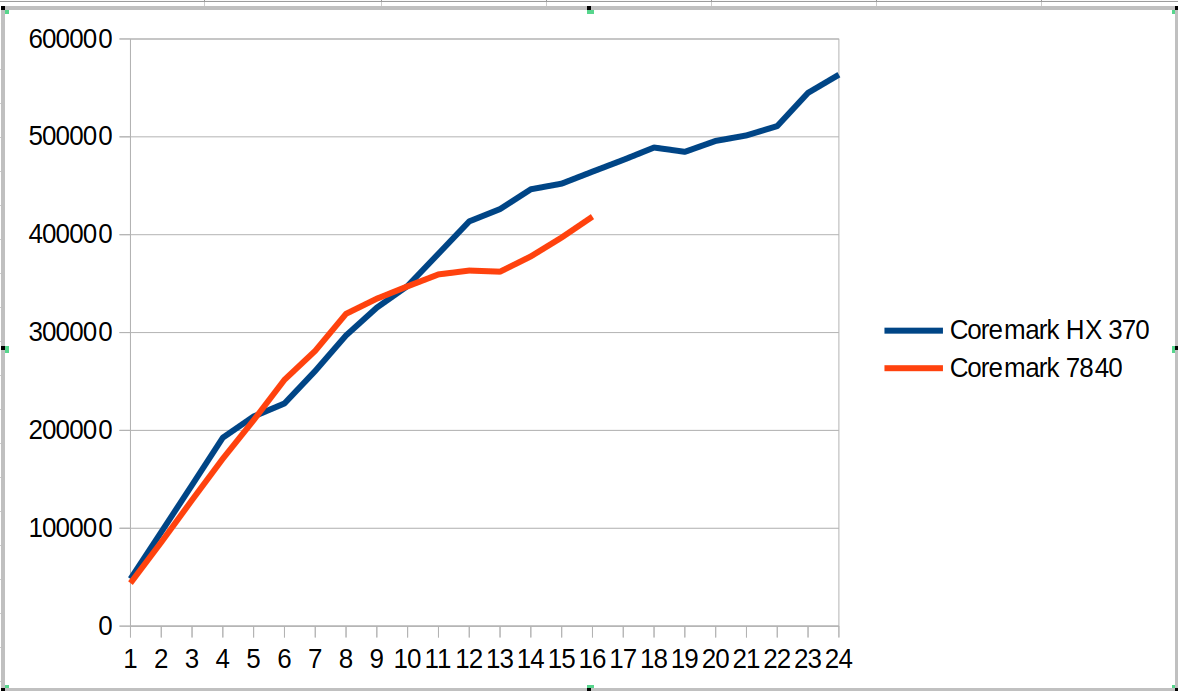
This hybrid SOC shows up in the following coremark scaling comparison as shown in the graph below. There are several different regions

  • From 1 to 4 cores we compare Zen4 cores against Zen5 cores. The coremark value for 4 cores is ~12% ahead.
  • From 5 to 8 cores, we now have Zen5 + Zen5C cores against Zen4 cores. The coremark value for 8 cores is ~7% behind
  • From 9 to 12 cores, we use all the cores on HX 370 and start using SMT for the 7840. The coremark value for 12 cores is 6% ahead
  • From 13 to 16 cores we go to using SMT for all the Zen5 cores and not-SMT for Zen5C cores. The 7840 moves to fully SMT. The coremark value for 16 cores is 11% ahead
  • From 17 to 24 cores, we go to adding SMT for Zen5C cores. The overall coremark using all cores (24 vs 16) is 21% ahead.

This suggests for coremark and other workloads there will be different regions where combinations of SMT and Zen5 vs Zen5C cores will create interesting comparisons between the systems.

The tabular version of coremark including performance counters is shown below.

CoresCoremark HX 370Coremark 7840Scaling HX 370Scaling 7840Retiring HX 370Frontend HX 370Backend HX 370Speculation HX 370SMT-contention HX 370Retiring 7840Frontend 7840Backend 7840Speculation 7840SMT-contention 7840
14824543881100%100%44.2%25.2%62.0%2.0%0.0%43.9%12.4%43.0%0.7%0.0%
29610685758100%98%44.0%25.5%61.8%2.0%0.0%43.9%12.4%43.1%0.7%0.0%
3144147128841100%98%44.0%25.5%61.8%2.0%0.0%43.6%13.0%42.7%0.7%0.0%
4192537171061100%97%44.1%25.4%61.9%2.0%0.0%43.9%12.3%43.1%0.7%0.0%
521422321036889%96%44.0%25.5%61.8%2.0%0.0%43.9%12.3%43.1%0.7%0.0%
622753225170579%96%44.0%25.4%61.9%2.0%0.0%43.2%12.9%43.2%0.7%0.0%
726081128136977%92%44.0%25.7%61.7%2.0%0.0%43.3%12.2%43.7%0.7%0.0%
829700231909877%91%44.1%25.3%61.9%2.0%0.0%42.7%12.8%43.8%0.7%0.0%
932541733460275%85%44.1%25.3%62.0%2.0%0.0%40.2%15.9%36.3%0.6%7.1%
1034763634724672%79%44.0%25.3%61.9%2.0%0.0%38.4%17.8%30.2%0.5%13.1%
1138058735940272%74%44.0%25.5%61.8%2.0%0.0%36.9%19.6%25.3%0.5%17.8%
1241357536328871%69%44.0%25.4%61.9%2.0%0.0%35.5%21.1%21.6%0.4%21.3%
1342612336214468%63%42.1%28.2%52.9%1.8%8.3%34.4%22.4%18.5%0.4%24.3%
1444637937776766%61%40.5%30.6%45.6%1.6%15.1%33.1%24.4%15.2%0.4%26.9%
1545213439714562%60%39.5%32.2%40.6%1.4%19.7%32.2%25.3%12.0%0.3%30.2%
1646443141846260%60%38.3%33.7%35.8%1.3%24.2%31.1%26.0%9.5%0.3%33.1%
1747641658%37.9%34.4%33.5%1.2%26.3%
1848900156%37.2%35.0%31.2%1.2%28.7%
1948465553%36.6%35.4%29.2%1.1%30.9%
2049582651%36.5%36.5%26.3%1.0%33.1%
2150145749%35.7%37.3%23.9%1.0%35.5%
2251094648%35.1%37.7%22.0%0.9%37.6%
2354489549%34.7%38.5%19.5%0.8%39.8%
2456347749%34.0%38.2%19.4%0.8%40.9%

I also measured stream and it looks ~15% faster than my 7840 system.

-------------------------------------------------------------
STREAM version $Revision: 5.10 $
-------------------------------------------------------------
This system uses 8 bytes per array element.
-------------------------------------------------------------
Array size = 100000000 (elements), Offset = 0 (elements)
Memory per array = 762.9 MiB (= 0.7 GiB).
Total memory required = 2288.8 MiB (= 2.2 GiB).
Each kernel will be executed 100 times.
 The *best* time for each kernel (excluding the first iteration)
 will be used to compute the reported bandwidth.
-------------------------------------------------------------
Number of Threads requested = 2
Number of Threads counted = 2
-------------------------------------------------------------
Your clock granularity/precision appears to be 1 microseconds.
Each test below will take on the order of 31409 microseconds.
   (= 31409 clock ticks)
Increase the size of the arrays if this shows that
you are not getting at least 20 clock ticks per test.
-------------------------------------------------------------
WARNING -- The above is only a rough guideline.
For best results, please be sure you know the
precision of your system timer.
-------------------------------------------------------------
Function    Best Rate MB/s  Avg time     Min time     Max time
Copy:           86725.2     0.018665     0.018449     0.021070
Scale:          86626.7     0.018713     0.018470     0.020643
Add:            88192.8     0.027540     0.027213     0.031095
Triad:          87655.3     0.027729     0.027380     0.031028
-------------------------------------------------------------
Solution Validates: avg error less than 1.000000e-13 on all three arrays
-------------------------------------------------------------

Here is a phoronix article comparing Ryzen AI 9 HX 370 with a variety of laptop systems. The overall geomean is ~10% but there is a wider variety between tests. Can be interesting to puzzle out why some of the differences. It is also likely that the power points used for the laptop comparisons in the phoronix article are less since I see lower scores e.g. coremark or different gaps than what I see with the same benchmark. So will need to puzzle out some of the SOC/power choices.

Posted in experiment, hardware | Tagged 7840HS, coremark, Ryzen AI 9 HX 370, stream, Zen5 | Leave a reply

Coremark scaling 7840HS

Performance analysis, tools and experiments Posted on September 27, 2024 by mevSeptember 27, 2024

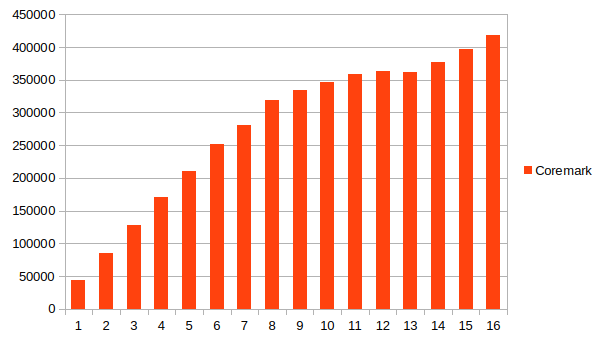
The following chart shows the Phoronix test suite coremark value when running from 1 to 16 cores.

CoresCoremarkScalingRetiringFrontendBackendSpeculationSMT-contention
143881100%43.9%12.4%43.0%0.7%0.0%
28575898%43.9%12.4%43.1%0.7%0.0%
312884198%43.6%13.0%42.7%0.7%0.0%
417106197%43.9%12.3%43.1%0.7%0.0%
521036896%43.9%12.3%43.1%0.7%0.0%
625170596%43.2%12.9%43.2%0.7%0.0%
728136992%43.3%12.2%43.7%0.7%0.0%
831909891%42.7%12.8%43.8%0.7%0.0%
933460285%40.2%15.9%36.3%0.6%7.1%
1034724679%38.4%17.8%30.2%0.5%13.1%
1135940274%36.9%19.6%25.3%0.5%17.8%
1236328869%35.5%21.1%21.6%0.4%21.3%
1336214463%34.4%22.4%18.5%0.4%24.3%
1437776761%33.1%24.4%15.2%0.4%26.9%
1539714560%32.2%25.3%12.0%0.3%30.2%
1641846260%31.1%26.0%9.5%0.3%33.1%

Graphically it looks as follows

The question is what causes the inflection points on the graph? The scaling from 1-8 cores decreases only slightly and my guess is the inflection point after this happens because of SMT contention. What is interesting is the second inflection point where for the first few additional SMT cores we decline but then settle in after that to become asymptotic to ~60% scaling.

Looking at the topdown performance counter profiles gives two general trends

  • As hyper-threaded cores are used, the amount of SMT contention goes up. This is somewhat expected for this workload with moderately high retirement rate. One limiter is is that the core is busy with the other thread.
  • The workload shifts from being more backend bound (43% down to 9.5%) to being more frontend bound (12.4% up to 26.0%). Assume a few effects here. Waiting on memory goes down from 34.4% to 6.9%, presumably because these multiple threads are making better use of caches. CPU also goes down but not as much. On the frontend side both latency stalls and bandwidth stalls become more important.

This test is useful to compare with other workloads and also other processors.

Posted in experiment | Tagged 7840HS, coremark, scaling | Leave a reply

Meta

  • Log in
  • Entries feed
  • Comments feed
  • WordPress.org

Archives

  • November 2024
  • October 2024
  • September 2024
  • July 2024
  • June 2024
  • March 2024
  • February 2024
  • January 2024
  • December 2023
  • February 2023

Tags

7840HS bad data benchmarks cachyos cluster compiler coremark cpu2017 data fabric getrusage gnuplot i5-13500H icache ipc kernel l3 metrics namd opcache perf performance counters perf_event_open phoronix Ryzen AI 9 HX 370 Ryzen AI 365 scaling stream threshold topdown tree virtualization website wsl Zen5

Recent Posts

  • Virtualization comparisons
  • Updating to a new kernel and graphics driver
  • SPEC CPU2017 Ryzen AI HX 370 vs. Ryzen 7840 HS
  • phoronix – Ryzen AI HX 370 vs Ryzen 7840 HS
  • New Ryzen AI 9 HX 370 machine
©2026 - Performance analysis, tools and experiments - Weaver Xtreme Theme
↑